
- Genre
- Simulation
- Players
- 1
- Works on phone
- Partly
How to play
- Press New game, pick a difficulty (Calm to Hardcore) and a save slot, then "Start game".
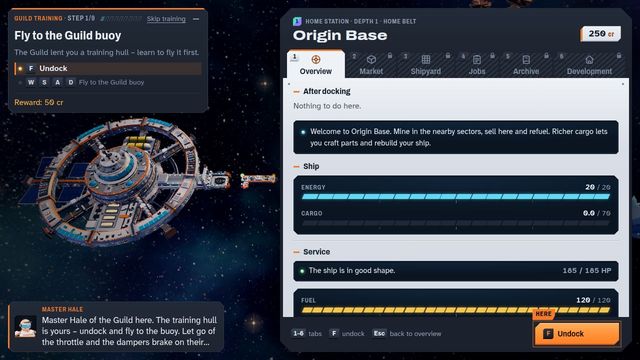
- Follow the guild training: step one is to press F to undock from Origin Base and then fly to the buoy.
- Fly with W, A, S and D; Esc takes you back to the station overview.
- Switch station tabs with the number keys 1 to 6 (Overview, Market, Shipyard, Jobs, Archive, Development).
Tips
- Use keys 1 to 6 at the station to jump between Overview, Market, Shipyard, Jobs, Archive and Development.
- Pick Calm if you want to learn without losing cargo on death.
- Games are saved in your browser, so use a save slot.
About Cinderbelt
Cinderbelt is a top-down space game that mixes flying, mining, trading and ship building. You start at Origin Base with 250 credits, 20 energy, a cargo hold of 70 and 120 fuel.
A nine-step guild training from a master named Hale starts with pressing F to undock and flying to a buoy. The station screen has six tabs on keys 1 to 6: Overview, Market, Shipyard, Jobs, Archive and Development.
The new-game screen lets you pick a difficulty from Calm to Hardcore and shows how harsh a death is, how strong the pirates are and how rich the mining fields are. It plays in English, Slovak and German. It was made by amoreo140 with Claude Code, under an MIT licence.
Is Cinderbelt free?
Yes. It plays free in your browser, with no download and no account.
Which difficulty should you start with in Cinderbelt?
Pick Calm to learn without losing cargo on death. The difficulty screen also shows pirate strength and the richness of mining fields before you start.
Does Cinderbelt save my game?
Yes. Games are saved in your browser, in the save slot you pick.
Does Cinderbelt work on a phone?
Partly. The title and new-game screens fit a phone; the ship is flown with W, A, S and D.
Can I make a game like this?
Yes. Follow the Claude Code build guide, then choose a game template. Make one like this